
MOM
Summer of 2026
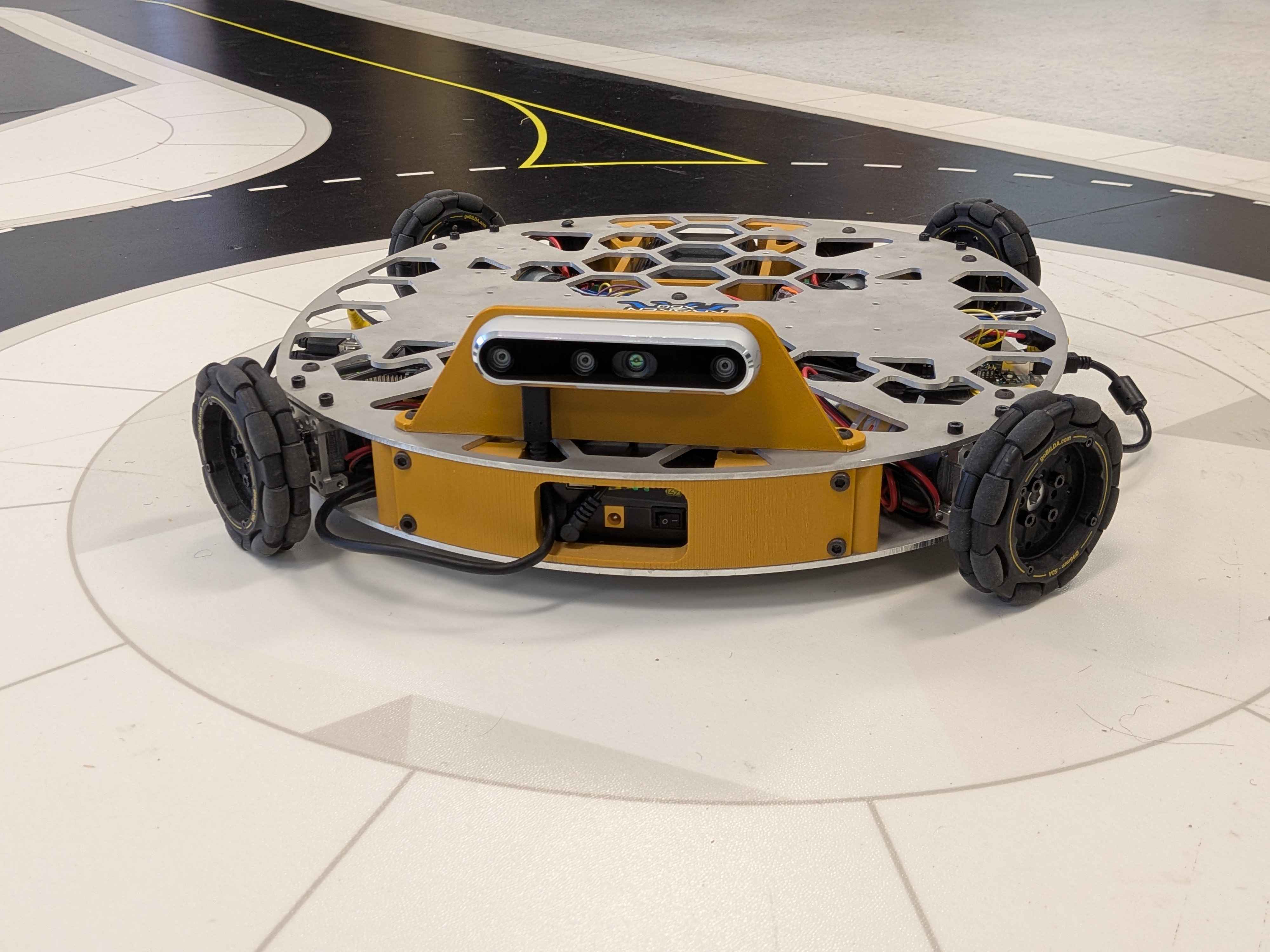
MOM was a robot that was intended for picking up toys and cloths from the floor. Through my software this robot achieved full wireless FPV control while being able to autonomously track, follow and avoid april tags.
I worked on this project at A&T CLAEM internship program. After working on AWARE for 7 weeks, I switched projects to help Luke and Archish develop the software for the robot: MOM. They had just finished building the robot and needed help with the software. I worked on this project for three days.
Please see the notable features below:Electronics and Communication
This robot used a Jetson Nano and Arduino so I chose to use the same communication system as I did for AWARE.This project uses a Jetson Nano and an Arduino to control the robot. The Jetson Nano acts as the brain and interprets sensor data from cameras, lidar, gps, etc, and controls the overall state of the robot. The Arduino recieves information from the Jetson Nano via Serial Port and then decides what to do with it. For example, the Jetson Nano may send a command that says FrontLeftDriveMotor,1 which tells the Arduino to set the left drive motor power to 100%.
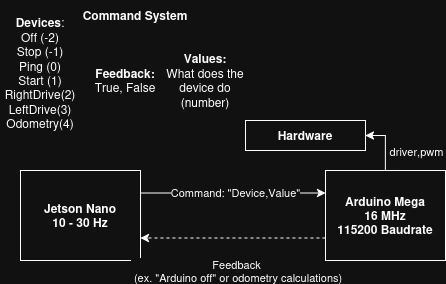 Above shows a diagram of the robots communication system between the Jetson Nano and Arduino.
To ensure the robot does not lose control when the Jetson Nano loses connection or crashes, the Arduino employs a heartbreat system where if the arduino does not receive a heartbeat (ping) from the Jetson Nano within a certain time (1.5 seconds), it will assume the Jetson Nano has lost connection and then stop all motor movements.
Wireless Control
To allow the user to control the robot wirelessly, I decided to use local, pre-existing wifi AND have bluetooth controller compabatibility. Since this robot was intended to be used indoors for picking up clothes and toys, I decided pre-existing wifi would work. Incase the user did not have a computer or the wifi was not working, I still wanted the user to be able to control the robot wirelessly, so I implemented bluetooth compatability. Next, I decided that the FastAPI uvicorn server and react front-end was unnessesary for simple web based camera feed and control interface, so I decided to use Flask (lightweight) as the web framework, and then SocketIO as the communication protocol connecting the Flask server to a pure HTML JavaScript CSS (simpler, lightweight) front end.
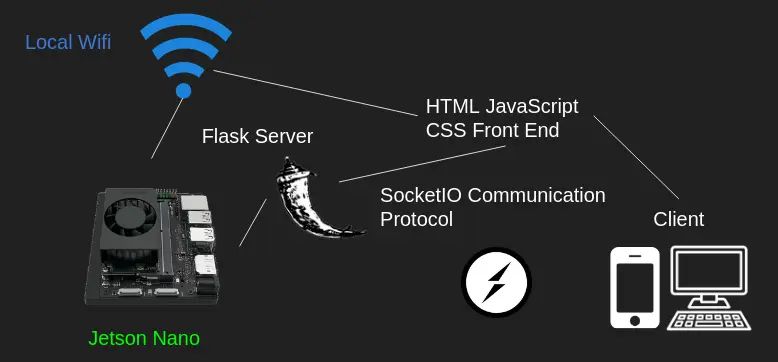 Above shows a diagram of the Robot Wireless Communication System
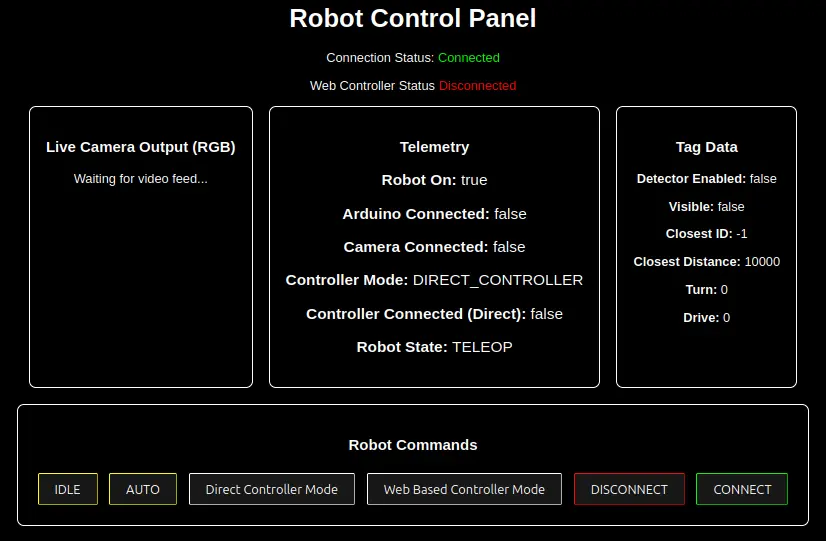 Above shows the interface. The user simply puts in the local wifi ip address + :5001 into search bar and connects to the robot's wifi.
To determine whether or not to use the web based controller or the bluetooth/direct controller, the robot assumes direct until the user uses the interface to switch modes.
Since the robot uses omni wheels in a square shape (X-Drive), the robot can drive in any direction.April Tag Following
To demonstrate object following, the robot uses an AprilTag fiducial marker to detect and follow a target object. This marker helps identify where the robot is located relative to the tag, and therefore can easily be implemented to follow. To have the user be able to control the robot both manually and in autonomous mode, I used a state machine where the robot's state changes depending on what the user inputs on there controller or web interface.
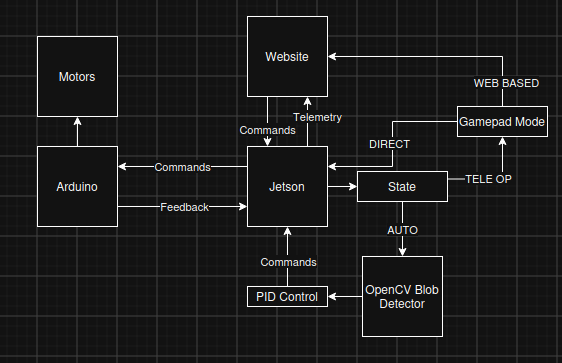 Above shows a general overview of the robot's control system.
Using openCV and an open source april tag detection library (pupil april tags), the robot can identify april tags. Then, based on the estimated distance relative to the tag, the robot can determine which tag to follow. Next, based on the pixel offset from the center of the camera and the center of the tag, the robot uses a PID Controller to turn the robot left or right proportional to the offset. Finally, the robot moves forward proportional to the distance to the tag.
Above shows the robot following an AprilTag.Above shows the robot following an AprilTag from the robot's perspective and with the addition of driving away from tags ID'd as 30.